> For the complete documentation index, see [llms.txt](https://docs.dextrabot.com/llms.txt). Markdown versions of documentation pages are available by appending `.md` to page URLs; this page is available as [Markdown](https://docs.dextrabot.com/farm/lighter-farming-module.md).
# Lighter Farming Module
### Overview
The Lighter Farming module enables you to set up automated trading on Lighter, a decentralized perpetual exchange on zkSync.
***
### Prerequisites
Before setting up the Lighter Farming module, ensure you have:
1. **Lighter Account:** A registered account on [Lighter](https://app.lighter.xyz/)
2. **Wallet Connection:** Your wallet connected to Lighter platform
3. **Minimum Balance:** At least 5 USDC deposited in your Lighter account
4. **API Key Generated:** Follow the steps in [Getting Your API Keys](https://app.lighter.xyz/apikeys) section
***
### Getting Your API Keys
#### Step 1: Access API Keys Section
1. Navigate to Lighter application at
2. Connect your wallet
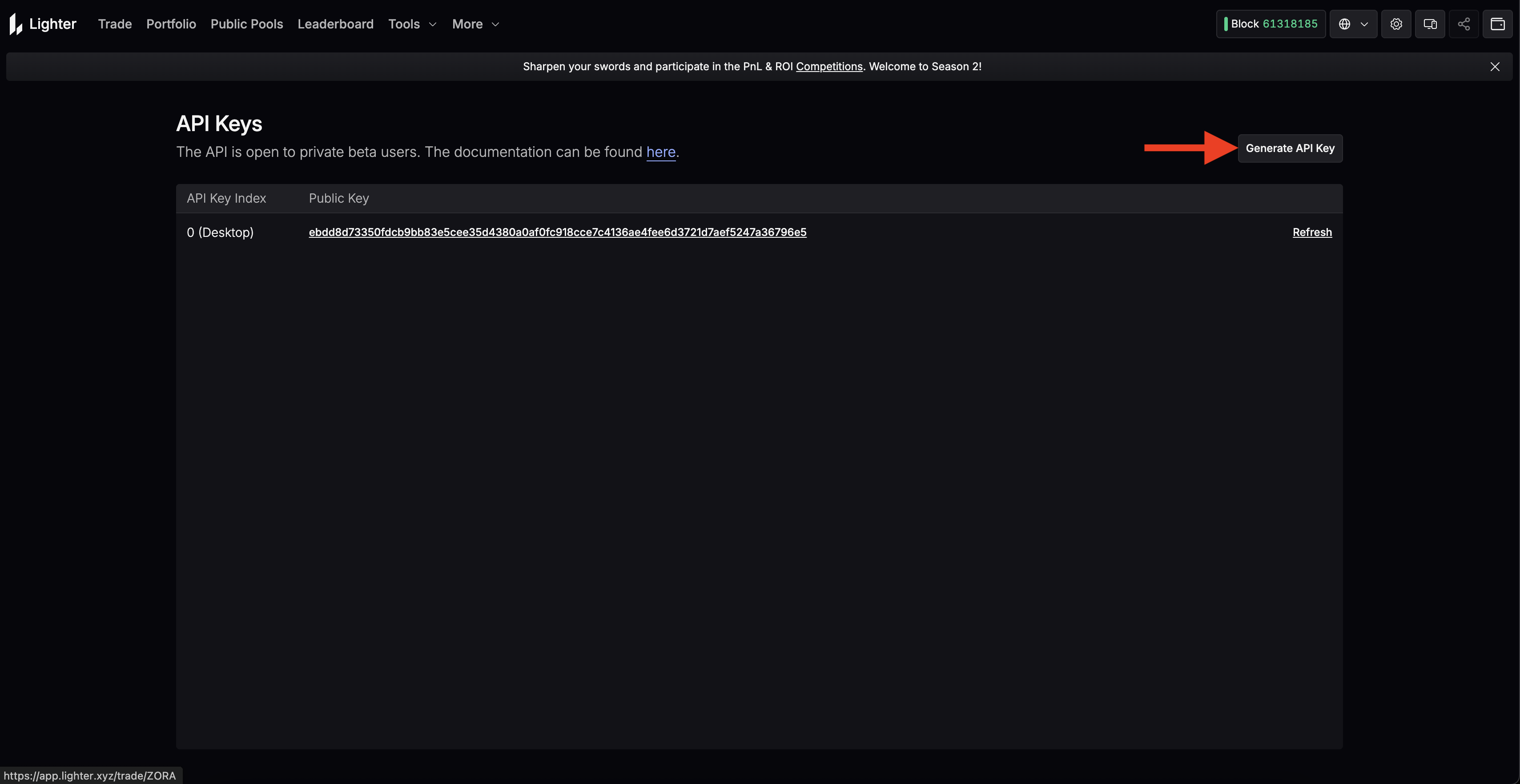
3. Click on **Tools** dropdown menu in the top navigation
4. Select **API Keys** from the menu
#### Step 2: Generate New API Key
1. On the API Keys page, click the **"Generate API Key"** button in the top right corner
#### Step 3: Set API Key Index
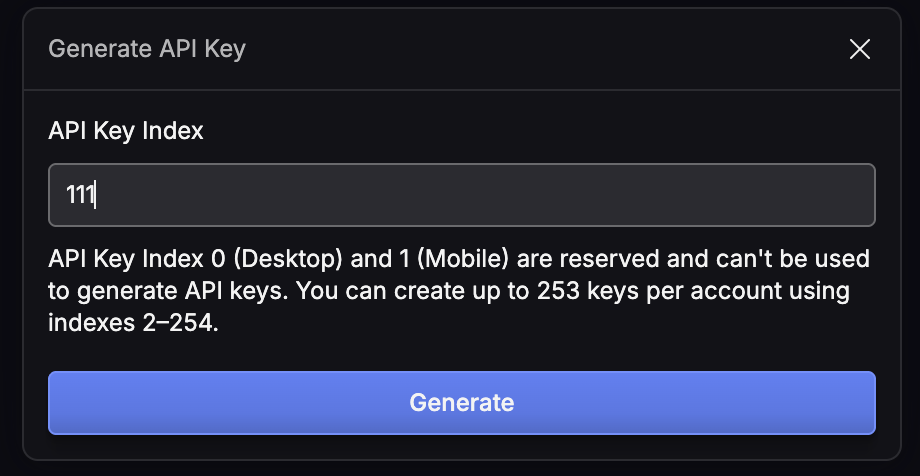
1. Enter an **API Key Index** number between 2-254
* **Important:** Indexes 0 (Desktop) and 1 (Mobile) are reserved and cannot be used
* You can create up to 253 keys per account using indexes 2-254
* Example: Use "111" or any number between 2-254
2. Click **"Generate"** button
#### Step 4: Save Your Keys
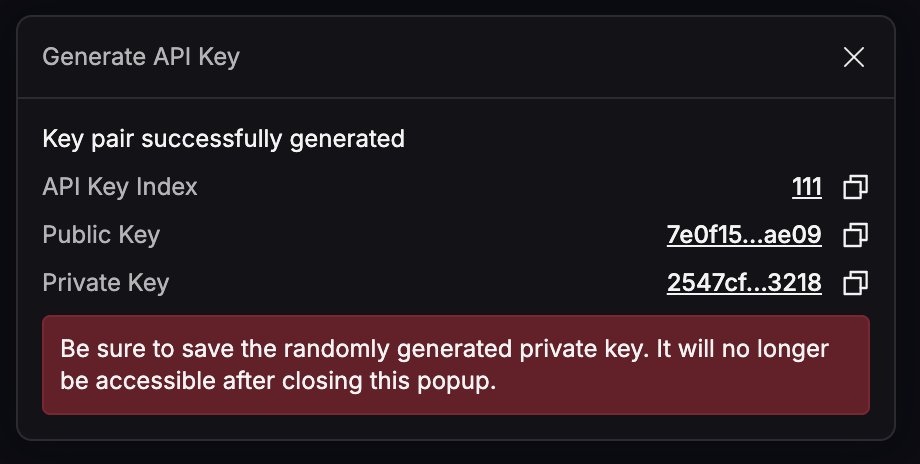
After generation, you'll receive three pieces of information:
1. **API Key Index:** Your chosen index number (e.g., 111)
2. **Public Key:** Your public key
3. **Private Key:** Your private key
**⚠️ CRITICAL:** Save your **Private Key** immediately! It will not be accessible after closing this popup. Store it securely - you'll need it for the farming module configuration.
### ⚙️ Farming Module Configuration
#### Accessing the Module
1. Open **DextraBot**
2. Go to the **Farming** tab
3. Select **Lighter** from the module list
***
### 📊 Configuration Parameters
#### Basic Settings
| Field | Description |
| ------------------- | ----------------------------------------------------- |
| **Login Address** | The wallet you used on Lighter |
| **API Private Key** | Paste the private key you saved earlier |
| **API Key Index** | The same index number you chose when creating the key |
| **Select Pair** | Choose which trading pair to farm |
#### Trading Parameters
| Field | Description | Range |
| ---------------------- | ------------------------------------------------------------ | ----- |
| Trade **Per Hour (n)** | How many trades happen per hour. More orders = more activity | 1-180 |
| **Leverage** | Position multiplier. 3× means profit/loss × 3 | 1-20 |
| **Direction** | LONG (buys only) • SHORT (sells only) • RANDOM (mix) | - |
| **Take Profit %** | Auto-close position when profit reaches this % | 0-100 |
| **Stop Loss %** | Auto-close position if loss reaches this % | 0-100 |
***
### 🧠 Order Types
Lighter gives you three "brains" for how your bot will open and close orders. Think of these as different **strategies** for trading behavior.
#### 🟢 MARKET Mode
**Strategy:** Fast entry, fast exit
* 1 hour split into **n random time slots**
* Each slot: Market order → Wait → Market close
* Best for: Volatile markets, quick trades
```
Timeline Example (n=10):
|--Market In--|-------Wait-------|--Market Out--|
5 min wait close
```
#### 🟡 LIMIT Mode
**Strategy:** Patient entry, smart exit
* 1 hour divided into **n equal blocks**
* First half: Try limit orders every 10 seconds
* Second half: Try limit exit, market if needed
* Best for: Stable markets, fee optimization
```
Timeline Example (1 block):
|---Try Limit Entry---|---Try Limit Exit---|
(10s intervals) (10s intervals)
```
#### 🔵 RANDOM Mode
**Strategy:** Natural mixed pattern
* Randomly chooses MARKET or LIMIT for each interval
* Creates organic-looking trading patterns
* Best for: Balanced approach, avoiding patterns
***
### 📐 Timing Formula Explained
#### How Time Intervals Work
```
Base Calculation:
average_interval = 3600 seconds ÷ n orders
Jitter Addition:
if n ≤ 20: variation = 25%
if n > 20: variation = 35%
Final Range:
minimum = average - variation
maximum = average + variation
```
***
### 🔄 Delta-Neutral Mode (Lighter-Lighter)
#### What is Delta-Neutral?
Uses **two Lighter accounts** with opposing positions:
* Account A → Always LONG
* Account B → Always SHORT
* Result: Zero market exposure, pure farming rewards
#### Configuration
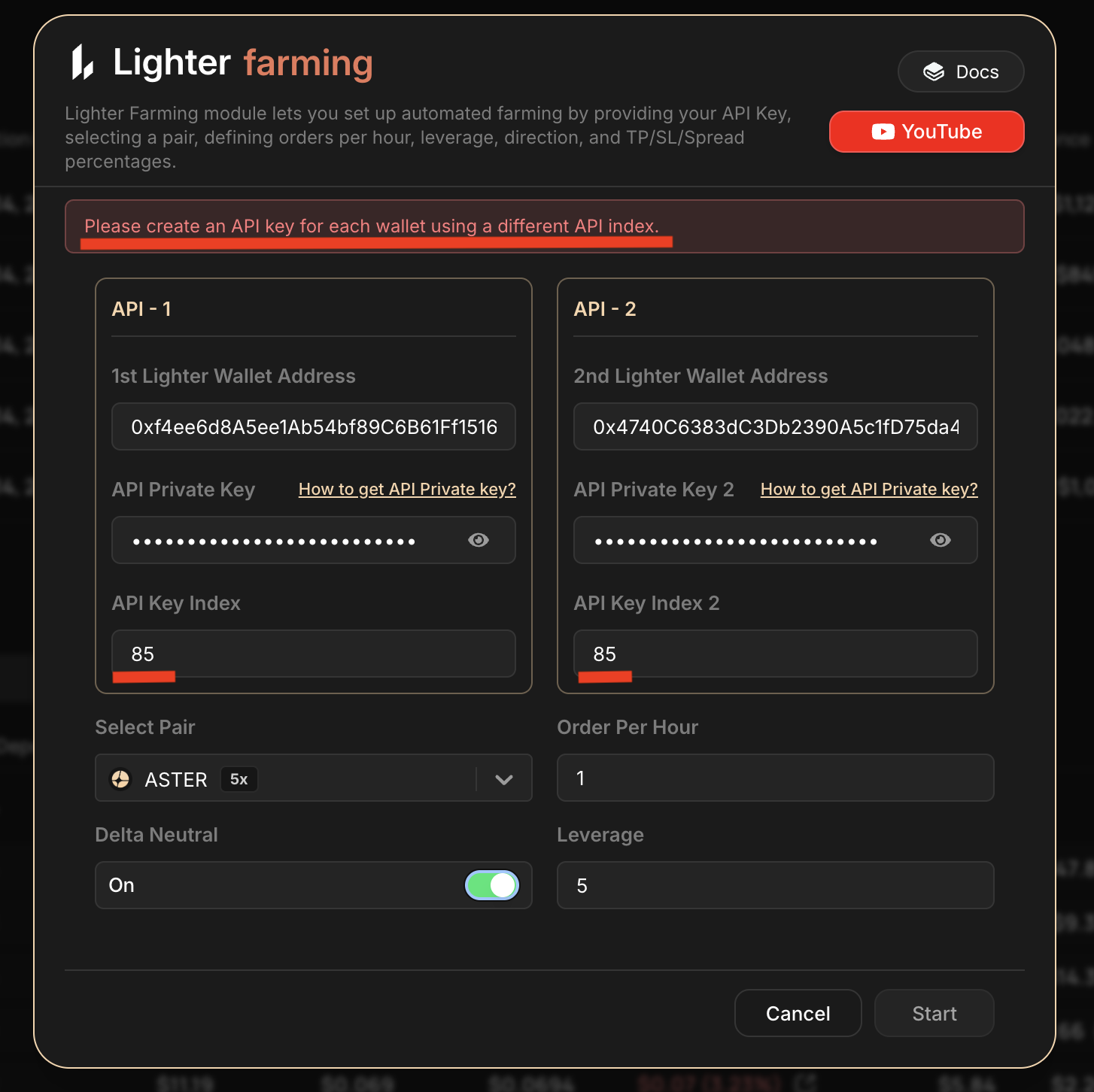
1. Set up two separate API keys (different wallets)
2. Configure both accounts in the module
3. Select "Lighter-Lighter Delta Mode"
4. Both accounts will mirror each other's timing
> ⚠️ **IMPORTANT:** Both wallets must use **different API Key Index numbers**! For example: Wallet A uses index 2, Wallet B uses index 3. If both wallets use the same index (e.g., both use 2), the system will NOT work!
---
# Agent Instructions
This documentation is published with GitBook. GitBook is the documentation platform designed so that both humans and AI agents can read, navigate, and reason over technical content effectively. Learn more at gitbook.com.
## Querying This Documentation
If you need additional information that is not directly available in this page, you can query the documentation dynamically by asking a question.
Perform an HTTP GET request on the current page URL with the `ask` query parameter, and the optional `goal` query parameter:
```
GET https://docs.dextrabot.com/farm/lighter-farming-module.md?ask=&goal=
```
`ask` is the immediate question: it should be specific, self-contained, and written in natural language.
`goal` is optional and describes the broader end goal you are ultimately trying to accomplish on behalf of the user. GitBook uses it to tailor the answer towards what is most useful for that goal.
The response will contain a direct answer to the question and relevant excerpts and sources from the documentation.
Use this mechanism when the answer is not explicitly present in the current page, you need clarification or additional context, or you want to retrieve related documentation sections.