> For the complete documentation index, see [llms.txt](https://docs.dextrabot.com/llms.txt). Markdown versions of documentation pages are available by appending `.md` to page URLs; this page is available as [Markdown](https://docs.dextrabot.com/copy-trade/cross-dex-ct-hyperliquid-to-lighter.md).
# Cross-DEX CT : Hyperliquid to Lighter
### Overview
DextraBot now introduces a groundbreaking feature - **Cross-Exchange Copy Trading**. You can now follow traders on Hyperliquid and automatically execute their trades on Lighter. This revolutionary capability allows you to leverage the best of both platforms while maintaining complete control over your trading execution.
### Key Benefits
* **Platform Flexibility**: Follow successful traders on Hyperliquid while executing trades on Lighter
* **Enhanced Liquidity**: Access Lighter's liquidity pool while copying Hyperliquid strategies
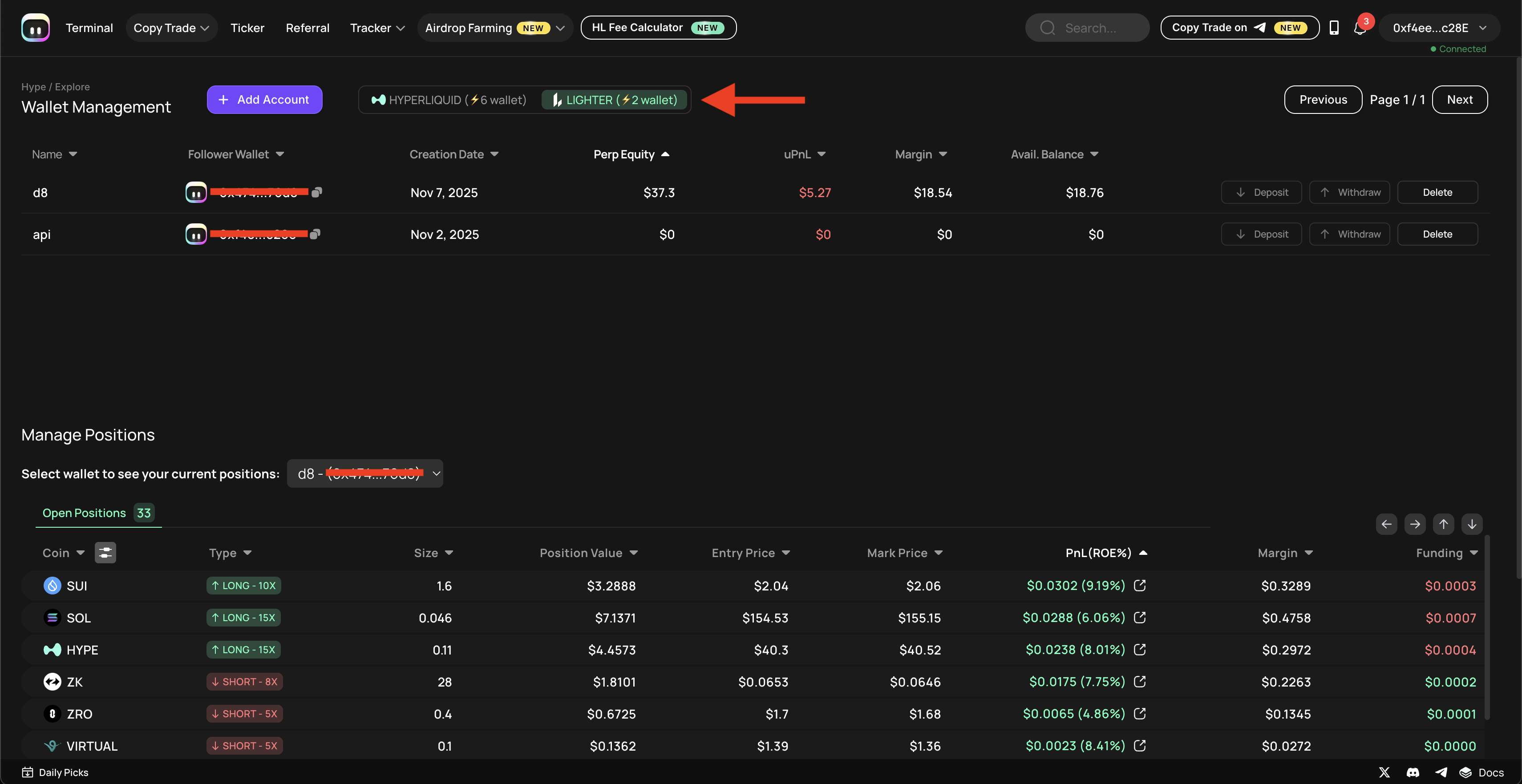
* **Unified Management**: Manage both Hyperliquid and Lighter wallets from a single interface
* **Real-time Synchronization**: Seamless position mirroring across exchanges
### Setting Up Lighter API Integration
#### Step 1: Generate Lighter API Keys
**1.1 Access Lighter Platform**
1. Navigate to
2. Connect your wallet to the platform
3. Click on **Tools** dropdown in the top navigation bar
4. Select **API Keys** from the menu
**1.2 Create New API Key**
1. On the API Keys page, click **"Generate API Key"** button (top right corner)
2. Set your **API Key Index**:
* Enter any number between 2-254
* **Important**: Indexes 0 (Desktop) and 1 (Mobile) are reserved
* Example: Use "111" or any preferred number within the range
3. Click **Generate**
**1.3 Save Your Credentials**
After generation, you'll receive:
* **API Key Index**: Your chosen index number
* **Public Key**: Your public API key
* **Private Key**: Your private API key
⚠️ **CRITICAL SECURITY NOTE**:
* Save your Private Key immediately - it won't be accessible after closing the popup
* Store it in a secure location
* Never share your Private Key with anyone
#### Step 2: Add Lighter Wallet to DextraBot
**2.1 Access Wallet Management**
1. Open DextraBot and navigate to **Wallet Management**
2. Click the **"Add Account"** button
3. Select **"Add API Wallet"** option
**2.2 Configure Lighter API Wallet**
In the wallet generation popup:
1. Select **LIGHTER** platform
2. Enter your **Wallet Name** (for identification)
3. Input your **Login Address**
4. Enter your **API Private Key** (from Step 1.3)
5. Enter your **API Key Index** (the number you chose, e.g., 111)
6. Click **Generate**
Your Lighter wallet will now appear in the wallet list and be available for copy trading.
### Configuring Cross-Exchange Copy Trading
#### Step 1: Access Copy Trade Module
1. Navigate to **Discover Wallets**.
2. Apply filters to find a trader that fits your criteria.
3. Click the **Copy Trade** icon next to their wallet.
#### Step 2: Select Trading Platforms
**2.1 Choose Target Platform**
1. In the **"Select target platform"** dropdown
2. Choose **Lighter** as your execution platform
**2.2 Select Your Wallet**
1. In the **"Select your wallet"** dropdown
2. Choose the Lighter API wallet you added earlier
#### Step 3: Configure Trading Parameters
**Method Selection**
* **Method III (Mirror)**: Advanced mirroring with enhanced features (Only method works for Lighter)
**Scaling Configuration**
* Set your position scaling percentage (up to 100%)
* **Note**: Due to Lighter's infrastructure, maximum scaling is limited to 100%
**Risk Management Settings**
1. **Copy Increase as Open Position**: Toggle ON to mirror position increases
2. **Stop Loss**: Set your stop loss percentage
3. **Take Profit**: Configure your take profit targets
4. **Include TWAP Orders**: Enable/disable Time-Weighted Average Price orders
5. **Direction Filter**: Choose ALL, LONG, or SHORT positions
6. **Future Listed Tokens**: Toggle ON to include newly listed tokens
7. **Asset Management**: Include or exclude specific assets (default: 182 assets)
8. **Run**: Toggle ON to activate the copy trading bot
9. **Copy Current**: Doesn't work on Lighter
#### Step 4: Apply Configuration
Click **Apply** to save your settings and activate cross-exchange copy trading.
### Managing Your Wallets and Positions
#### Wallet Switching
In Wallet Management, you can easily switch between:
* **Hyperliquid wallets** (marked with HYPERLIQUID badge)
* **Lighter wallets** (marked with LIGHTER badge)
#### Position Monitoring
The **Manage Positions** section shows:
* **Open Positions**: Active trades across both platforms
* **Position Details**:
* Coin/Trading pair
* Position type (LONG/SHORT)
* Size and value
* Entry price and mark price
* PnL (ROE%)
* Margin and funding rates
### Important Notes
#### Platform Limitations
* **Scaling Limit**: Lighter infrastructure supports maximum 100% scaling
* **API Index Range**: Must use indexes 2-254 (0-1 are reserved)
---
# Agent Instructions
This documentation is published with GitBook. GitBook is the documentation platform designed so that both humans and AI agents can read, navigate, and reason over technical content effectively. Learn more at gitbook.com.
## Querying This Documentation
If you need additional information that is not directly available in this page, you can query the documentation dynamically by asking a question.
Perform an HTTP GET request on the current page URL with the `ask` query parameter, and the optional `goal` query parameter:
```
GET https://docs.dextrabot.com/copy-trade/cross-dex-ct-hyperliquid-to-lighter.md?ask=&goal=
```
`ask` is the immediate question: it should be specific, self-contained, and written in natural language.
`goal` is optional and describes the broader end goal you are ultimately trying to accomplish on behalf of the user. GitBook uses it to tailor the answer towards what is most useful for that goal.
The response will contain a direct answer to the question and relevant excerpts and sources from the documentation.
Use this mechanism when the answer is not explicitly present in the current page, you need clarification or additional context, or you want to retrieve related documentation sections.